UNJIGGLE
Organize your iPhone home screen from your Mac
Moving an app from page four to a full page one gets old fast. Plug in your iPhone, see the layout on your Mac, and preview where your apps could go.
The USB scan reads app names, folders and positions, not photos or messages. AI requests happen only when you ask. Read the privacy guide
Scan and preview whole-layout presets for free. Apply and custom AI planning require Pro ($19, one time). Scanning doesn't move your apps.
Apple Silicon · macOS 14+ · iPhone connected over USB · Opens an email draft; nothing is sent automatically.
Download directly on a Mac
Just curious? Take the home-screen quiz · Your answers, not a phone scan
Sample preset preview · no iPhone connected

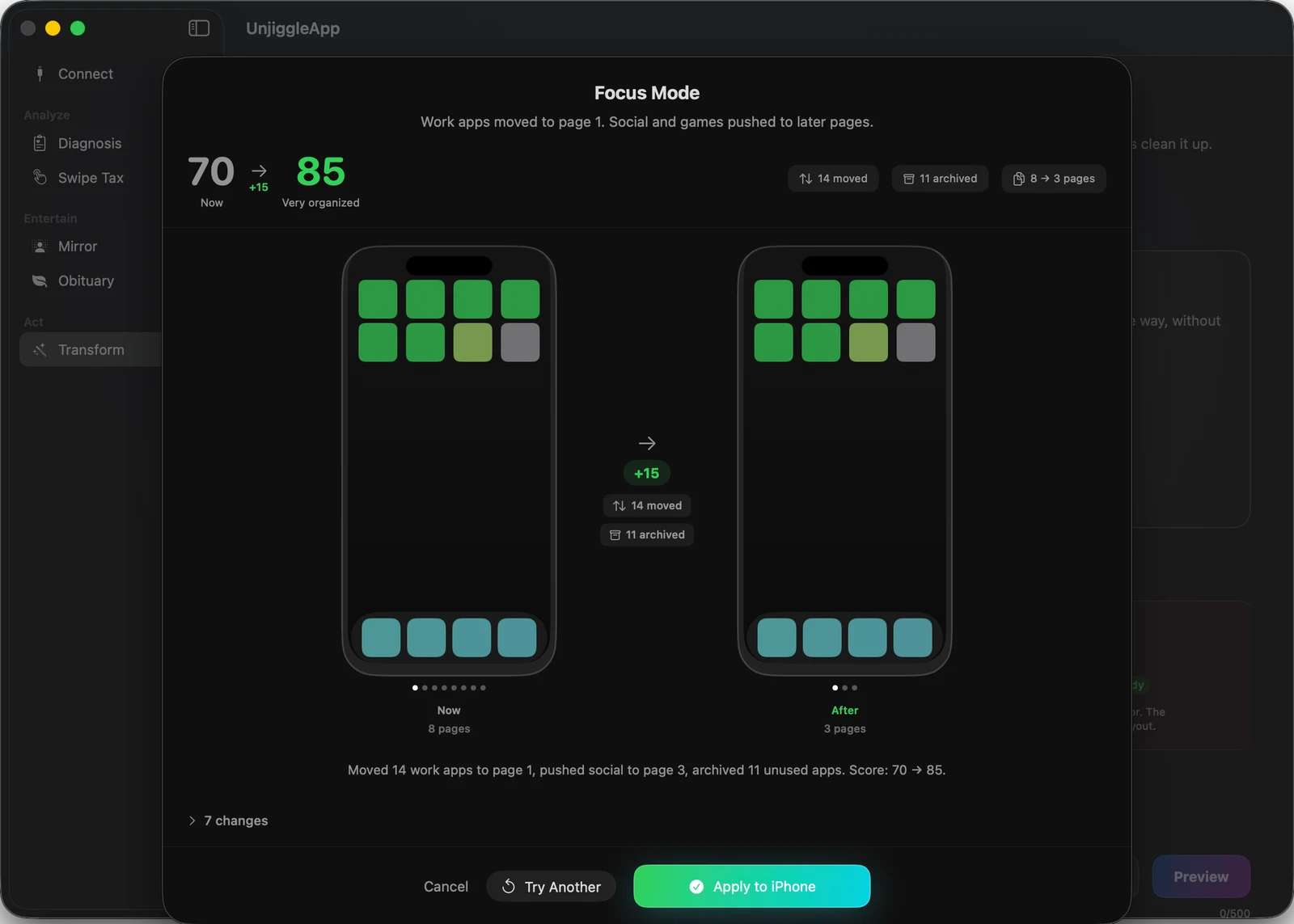
This sample preset proposes fewer pages. Nothing moves until you choose Apply.
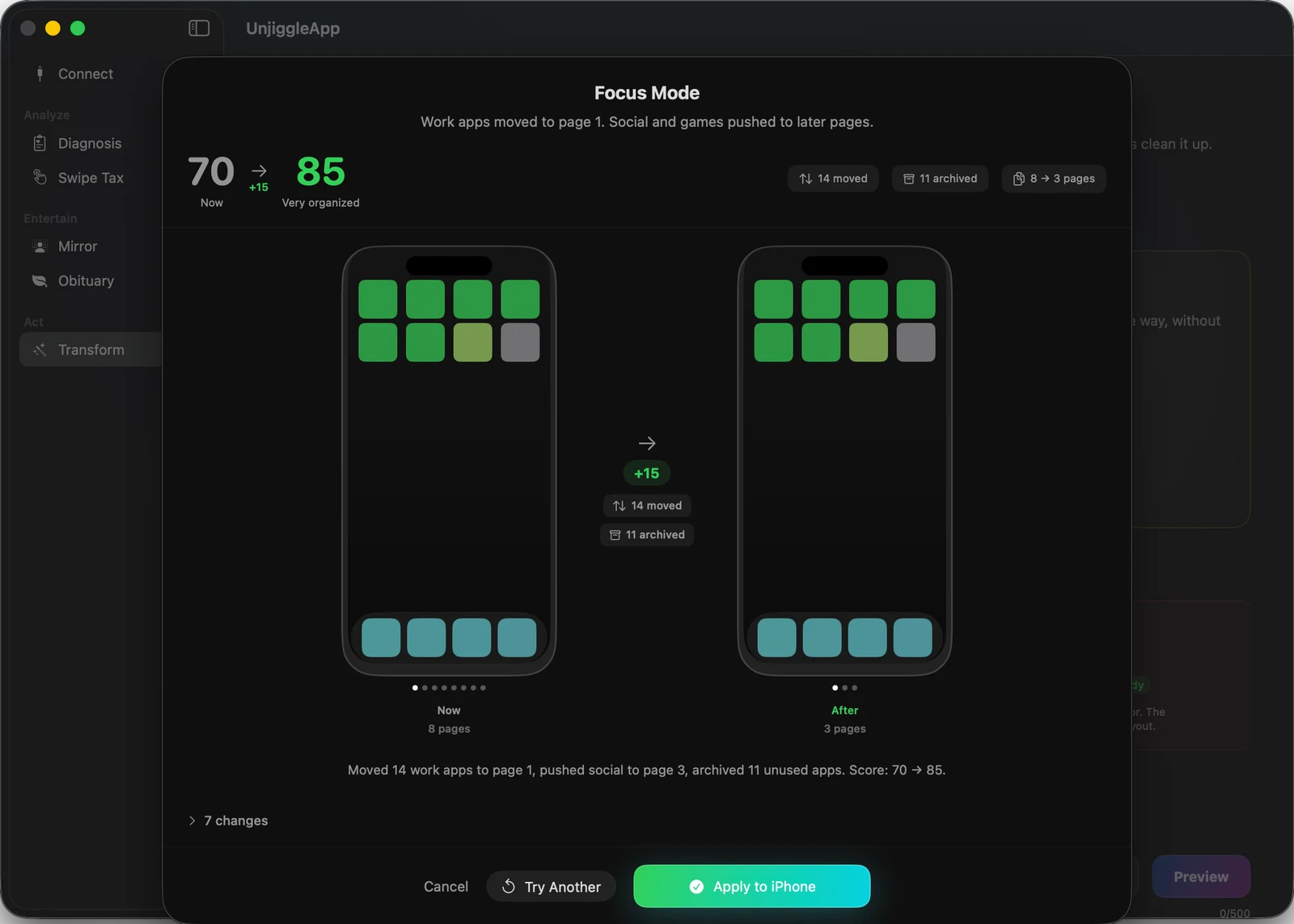
Preset preview in the Mac app · sample data, no iPhone connected · Apply requires Pro
See the preview full size · Watch the 14-second overview ↓
Reads your app names, folders, and positions over USB. Never your Photos, Messages, or Contacts. Your layout leaves your Mac only when you ask for an AI result. Verify it — the engine is open source →
92 MB · Apple Silicon · macOS 14+
AI-powered Mirror, Obituary and AI Stylist send your app names and layout to an AI provider. With Pro's included AI, they go through unjiggle.com to Anthropic and need no API key. With your own key, they go straight to Anthropic or OpenAI. Scans and scores stay on your Mac; license, update, and App Store lookups use the network without sending your layout.
Prefer the terminal? Try the sample CLI layout with an assistant before connecting a phone.
304 apps, three pages
Leo (@runes_leo) shared how he organized his iPhone with an AI assistant and the open-source Unjiggle CLI. He reported 304 apps across three pages. He also described iOS reflowing the first write before a later attempt settled.
That's his CLI experience, not a paid Mac app testimonial or a promise for every phone.
Read Leo's original post · His walkthrough · Try the CLI with an assistant
14 seconds, no magic trick
What the Mac app actually looks like
This is Unjiggle running with sample data. The free Diagnosis gives you a score and a read on your layout. No iPhone was connected for this demo, and no apps were reorganized.
Start with the free quiz →The quiz uses your answers. For an actual scan, download the free Mac app and plug in your iPhone.
Your phone has a personality
Every version of you
is still installed
Still keeping the running app from your marathon era? Take our free quiz and see what your apps say about you.
- 6 questions
- No signup
- Works on your phone
The quiz uses your answers, not a scan of your phone. For a real layout scan, use the free Mac app over USB.
Read the story and music credits
I download potential. Opening the apps is a separate hobby. Duolingo: fluent by summer. Bonjour is as far as I got. Strava: marathon era. Bought the shoes, obviously. AllTrails: outdoors person. 43 saved trails, zero hikes. Calm: new year, new me. The old me kept all the apps.
Every version of me is still installed. I took the quiz. The result: The Wellness Seeker. “Every January resolution leaves a digital trail.” I did not come here to be understood. Which era is your phone in?
The app history is fictional. The quiz screens and result are real examples. The Mac app's personalized AI roast is a separate experience.
Music: Sneaky Snitch by Kevin MacLeod (incompetech.com), licensed under CC BY 4.0. Excerpted and mixed with original sound effects.
Illustrated story · actual quiz results
See what's taking up your home screen
Unjiggle reads your home screen layout (no photos, no screenshots). It tells you what's broken and shows you what better could look like. Illustration — scores shown are examples, not a real scan.
Before — score 32
After — score 89
A score and four share cards
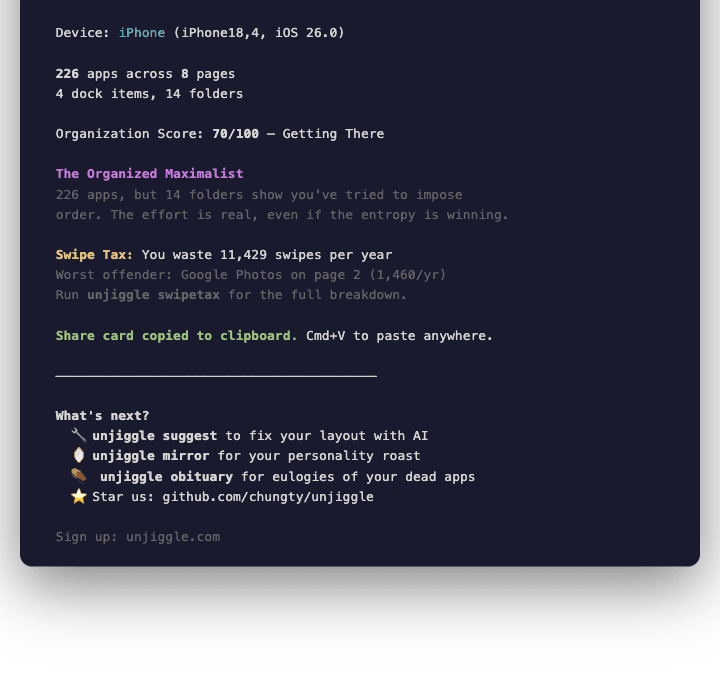
Each card auto-copies to your clipboard. Cmd+V into iMessage, Bluesky, X, or Instagram — or hit export for an Instagram Story-sized image. Sample data shown.
How it works
Open Unjiggle and connect your iPhone via USB cable
Tap Trust on your phone — the app reads your home screen layout, never your photos or messages
See your layout and organization score on your Mac
Preview a whole-layout preset for free. Nothing moves yet.
Apply with Pro, or ask Pro AI Stylist for a custom plan. Saved-layout Undo lets you go back.
What Unjiggle reads and what it leaves alone
The USB scan reads your layout. Optional Screen Time access and AI requests are explained in the privacy guide.
✓ What Unjiggle reads
- ✓App names
- ✓Bundle IDs
- ✓Folder names
- ✓Page positions
✕ What it never touches
- ✕Photos
- ✕Messages
- ✕Contacts
- ✕Health data
- ✕Mail messages on your iPhone
- ✕Browsing history
For developers
Prefer the terminal
The open-source macOS CLI reads layouts, scores them, and previews changes. Start with a sample before giving an assistant access to your phone.
pip install unjiggleunjiggle demo